Raspberry Pi
Yoe supports the following Raspberry Pi projects:
| Project | Board | Architecture |
|---|---|---|
rpi4-32 | Raspberry Pi 4 | 32-bit ARM |
rpi4-64 | Raspberry Pi 4 | 64-bit ARM |
rpi5 | Raspberry Pi 5 | 64-bit ARM |
Raspberry Pi 5
The Raspberry Pi 5 is the latest generation featuring a Broadcom BCM2712 SoC with quad Cortex-A76 cores at 2.4 GHz, VideoCore VII GPU, and 4 or 8 GB LPDDR4X RAM. It adds a PCIe 2.0 x1 connector (for NVMe HATs), dual 4Kp60 HDMI output, and a dedicated UART connector for the Raspberry Pi Debug Probe.
The Pi 5 requires a USB-C power supply capable of 5V/5A (25W) for full performance. A 5V/3A supply will work but may throttle under load.
Raspberry Pi 4
The
Raspberry Pi 4
features a Broadcom BCM2711 SoC with quad Cortex-A72 cores at 1.8 GHz, up to 8
GB LPDDR4 RAM, dual micro-HDMI (4Kp60), Gigabit Ethernet, USB 3.0, and dual-band
WiFi. Both 32-bit (rpi4-32) and 64-bit (rpi4-64) builds are supported.
Building/installing an image
git clone https://github.com/YoeDistro/yoe-distro.gitcd yoe-distro. ./envsetup.sh <project>(e.g.,rpi4-64,rpi5)yoe_setupbitbake yoe-simple-image- Insert SD card
lsblk(note SD card device, and substitute for /dev/sdX below)yoe_install_image /dev/sdX yoe-simple-image(Note, Etcher can also be used to write images to SD cards).- Optional: configure console for serial port (see below)
sudo eject /dev/sdX- Install SD card in the Raspberry Pi and enjoy your new image
Enable serial console
The serial console for the rPi3/4 can be enabled by adding ENABLE_UART = "1"
to local.conf. This is currently done in local.conf, but has tradeoffs as
described in the BSP layer
documentation.
Connecting to the serial console
The Raspberry Pi serial console is available on the 40-pin expansion header. A USB-to-serial cable with flying leads is a convenient way to connect to this. FTDI (as well as many other companies) supply these cables. The below image shows how the FTDI cable is connected:
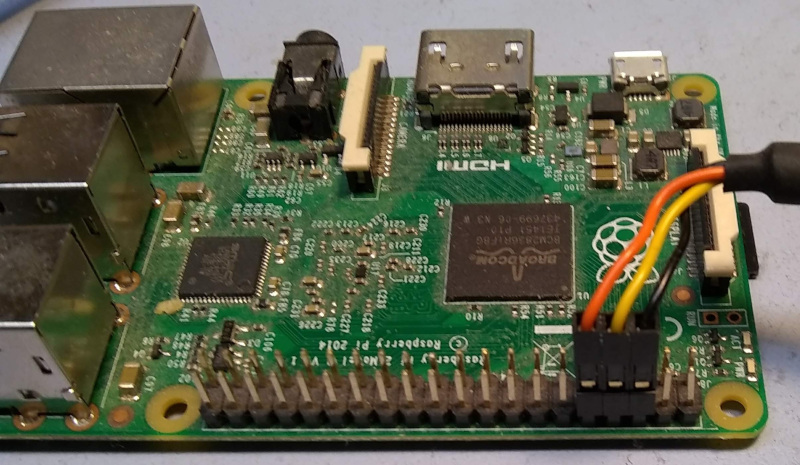
The relevant signals are:
- FTDI Black (GND) <-> rPI Pin 6 (GND)
- FTDI Yellow (RXD) <- rPI Pin 8 (TXD)
- FTDI Orange (TXD) -> rPI Pin 10 (RXD)
On the Raspberry Pi 5, you can also use the dedicated 3-pin UART connector with the official Raspberry Pi Debug Probe.
See the Raspberry Pi documentation for more information.
Power Supply
Some Raspberry Pi products are sensitive to power quality. It is recommended to use the official power supply for your model:
- Pi 4: 5.1V/3A USB-C supply
- Pi 5: 5V/5A (27W) USB-C supply for full performance
An inadequate supply may result in lockups or SD card file system corruption.