BeagleBone Black
BeagleBone Black system reference manual
Building/installing an image
git clone https://github.com/YoeDistro/yoe-distro.gitcd yoe-distro. ./envsetup.sh beagleboneyoe_setupbitbake yoe-simple-image- Insert SD card
lsblk(note SD card device, and substitute for /dev/sdX below)yoe_install_image /dev/sdX yoe-simple-image(Note, Etcher can also be used to write images to SD cards).cp deploy/beaglebone_0.0.1.upd /run/media/<SD card boot partition>/sudo eject /dev/sdX- Connect serial console (instructions below)
- Install SD card in a BeagleBone
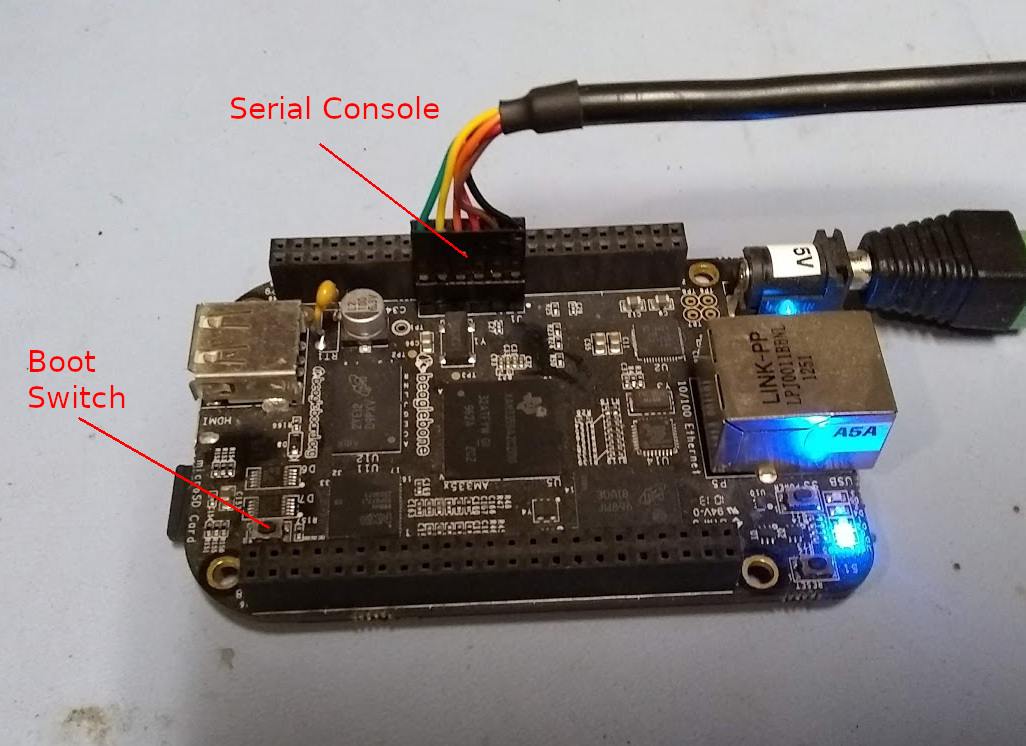
- Hold the boot switch, apply power, and the BeagleBone will boot from the SD card and install Yoe to the eMMC flash
- Remove power and SD card. Yoe should now boot from eMMC.
Serial Console
The BeagleBone Black serial console is available on a 6-pin header as shown in the image below. The pinout matches a standard 3.3V FTDI 6-pin connector.